

Liteapks is a game management tool designed for the Android operating system. It allows users to download modified versions of various games and manage their downloaded game content. The platform features a wide array of categories and curated recommendations, making it easy for users to find the specific games—including modified versions—they want to play. Beyond games, the tool also offers a variety of applications. Its convenient management features enable users to monitor download progress and view installed games and apps, organizing them into a neat, easy-to-navigate list. The software is designed for a global audience and supports multiple languages.
Features
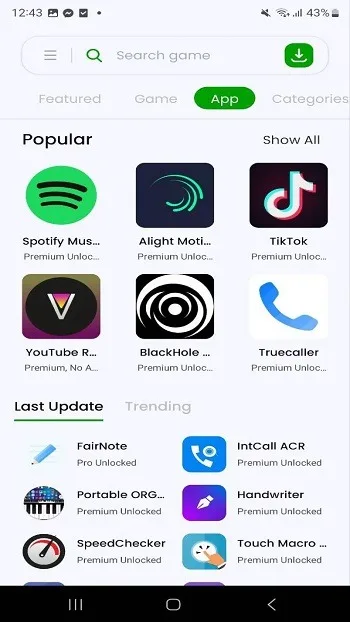
Well-organized sections for quick discovery
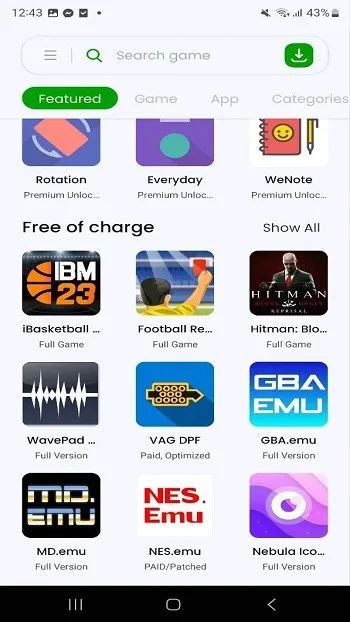
Liteapks highlights key categories such as "Editor's Picks," "VIP Essentials," and "Latest Games," ensuring you can easily access reliable and up-to-date content. By showcasing noteworthy titles and new additions, these sections save you from having to scroll through long, exhaustive lists—allowing you to jump straight into relevant games before exploring the broader library.
In-depth categorization of games and apps
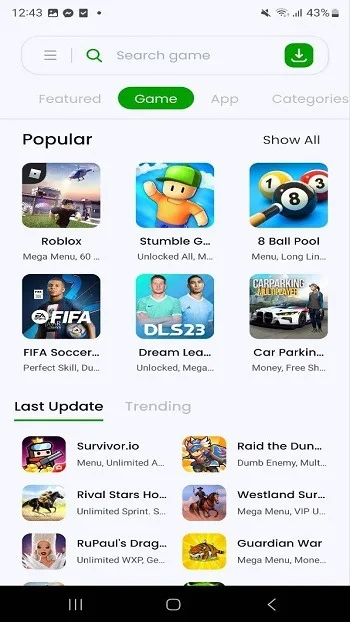
You can browse by games or apps, then refine your search by genre or purpose to find exactly what you’re looking for. For instance, if you’re in the mood for a specific style of gameplay, you can navigate to categories like Action, Role-Playing, or Simulation. If you need utility tools or creative apps, you can explore categories such as Tools, Photography, and more. This structure makes it simple to find content that aligns with your personal preferences.
One-tap downloads and effortless management
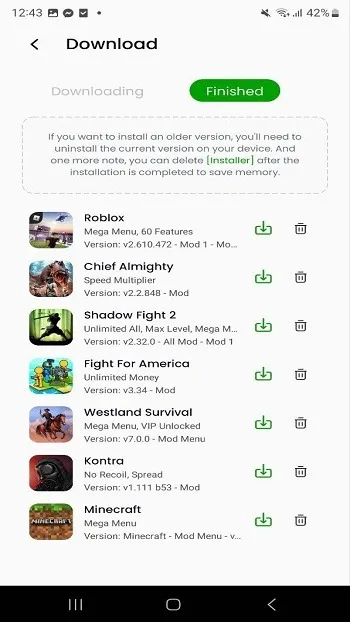
Liteapks is built for speed and efficiency. Start a download with a single tap, then check its progress and status right where you left off. Once downloaded, your installed games and files are kept in one central location, where intuitive controls allow you to open, review, or delete items with ease. This streamlined workflow helps you stay focused and minimizes the need to switch between different screens.
Multilingual interface for a global user base
The interface supports multiple languages, ensuring that users everywhere can easily navigate through tabs and sections. You can switch languages as needed, while the app maintains a clean, consistent layout across all options. With clear text and recognizable icons, you’ll have no trouble identifying actions, even if you decide to change the language.
Stay organized with lists and tracking features
Liteapks includes helpful tools that allow you to create lists and keep track of everything you have downloaded. You can mark items to view later, then return to these lists whenever you are ready to install or manage them. Over time, these lists act as a personal queue, keeping your selections organized without the need for manual record-keeping.
Usage
Open Liteapks to view the home screen and the main sections displayed at the top.
Check out "Editor's Picks," "Essential VIP," or "Latest" to browse featured recommendations and new additions, then tap any item to open its details page.
Navigate to "Categories" to filter by games or apps, and refine your search by selecting genres such as Action, Role-Playing (RPG), Simulation, Tools, or Photography.
Tap the download button on an item's details page to begin the download. Once finished, you can check the download status on the same page or within your library.
Create lists to save items you’re interested in, then revisit these lists—along with your installed titles—to update, launch, or remove them as needed.
FAQs
Is Liteapks safe to use?
Yes. Liteapks performs regular security checks on its listings and clearly displays app permissions, helping users make informed decisions before downloading.
How do I download apps from Liteapks?
Simply search for an app by name on Liteapks, review its information and ratings, and tap "Download." The app will then be installed directly onto your Android device.
Does Liteapks provide regular app updates?
Absolutely. Apps on Liteapks are continuously updated, ensuring users can be among the first to experience the latest features and improvements.
Conclusion
Liteapks is ideal for users who want a simple way to explore modified games and keep their downloads organized. Designed with quick browsing in mind, it allows you to move seamlessly between the latest recommendations and classic collections.








