

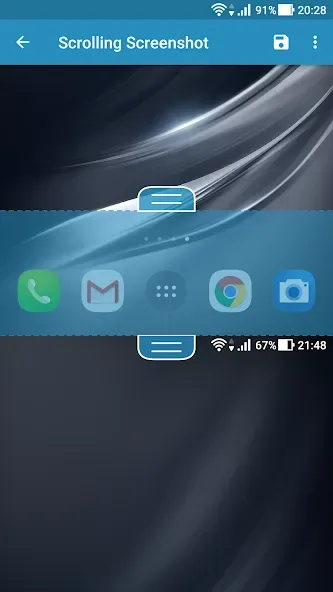
Screenshot Easy is a mobile screenshot tool designed for use on smartphones and tablets. It offers a variety of capture methods, including selecting specific areas or taking scrolling screenshots. Beyond simple screen captures, the app also supports screen recording. Once a screenshot or recording is complete, you can easily save the file within the app or share it with friends. The software includes built-in editing tools, allowing you to add emojis and text, adjust frame rates, or crop and merge images to suit your specific needs. Additionally, it features image management capabilities, enabling you to create and name separate folders for your screenshots and recordings, making them easy to locate later.
Features of Screenshot Easy:
Screen Recording: Record your screen activities, which are perfect for tutorials or sharing gameplay videos.
Built-in Image Editor: Edit screenshots with tools like drawing and adding text, layers, and emoticons.
File Management: Organize screenshots into subfolders to separate them based on apps or categories.
Multiple Image Formats: Save screenshots in different formats such as JPG, PNG, and WEBP.
Screen Recording Customization: Adjust settings like framerate, bitrate, audio recording, and encoding (MP4).
Quick Settings Tile: Access the app quickly through your device’s quick settings menu.
Functions of Screenshot Easy:
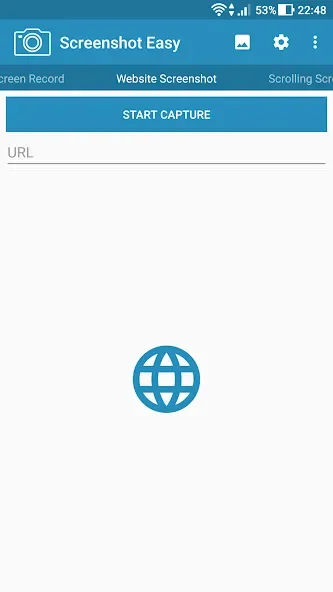
Screenshot Easy covers most everyday capture needs. It supports regular screenshots, full-page website screenshots, scrolling screenshots for long content, and screen recording for video.
Scrolling capture and website capture are standout features. You can grab an entire page instead of stitching together several smaller shots, and the app can create a full-size image of a web page in high quality. For websites, it can use a shared URL from the browser to capture a complete view.
On the video side, the screen recorder can encode clips in MP4 and gives control over framerate, bitrate, and audio recording. That makes it suitable for recording app demos, simple how-tos, or other on-screen activity, as long as your device supports it.
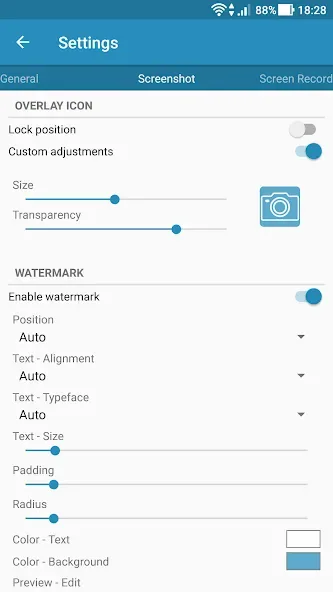
Where Screenshot Easy really shines is in how you start a capture. The app offers several trigger options, including an overlay icon, a hidden touch area, a notification icon, a device shake, a camera hardware button, widgets, shortcuts, and support for automation tools like Locale and Tasker. You can even start capture when the device is connected or disconnected from power.
This flexibility is especially helpful if you find the usual two-button shortcut awkward or unreliable. Someone with reduced finger mobility or dexterity, for example, can rely on the on-screen overlay or a single hardware button instead of pressing a combination. One user noted that taking a batch of screenshots became much quicker this way, cutting the time significantly compared with the standard Android method.
User Reviews of Screenshot Easy:
Definitely a top-notch app. I've never used another screenshot app because I found this one first and I can't seem to think of any reason to change. None. I give very few apps the "full five", but I have no hesitation with this one. Easy to use, always ready if you enable it to be, I use it more than almost any other app I have. Great going guys, not many can say they've developed an app that has stood the biggest test of all - Time.
Screenshot Easy is the best App to get immediate quick photos of all the data that I encounter online. It sends the photos to my Gallery App on my cell phone. It also has the ability to classify the photos in any way I like as ALBUMS. What I especially like is that the Cool Cleaner App is very easy to install on my Cell phone. I do not have to do complicated finger presses on different buttons like the Volume and Power buttons, as is other Apps. The best feature is that it is Free.
I've been looking for a RELIABLE screenshot program that also works as a plugin for Tasker, since all I had tried would fail easily 80% if the time when called from a Tasker task. I stumbled on this app and after several weeks of daily use, it seems to catch over 90% of the screenshots I call from that Tasker task. I am beyond thrilled!! That, alone, earns it 5 stars. I haven't yet tried its other functions, but if they didn't work at all it still gets 5 stars for doing what I need reliably.
Best app for clear, high resolution, full page screenshots. This is pretty much all I use it for. Really appreciate the desktop mode and remove sticky items feature. The screenshot even stays clear after it's been cropped - I've had problems with other, similar apps not being able to do this. I also use the crop feature, as it's easier than the one on my device. Thanks so much for the amazing app!
Final words:
Screenshot Easy is a useful tool if you take lots of screenshots with your Android, since it offers you more options and more control.In addition to these options, and depending on your Android model, Screenshot Easy also lets you activate additional shortcuts for taking screenshots. You can choose to take a screenshot by shaking your device, pressing the notification icon, or several other options.








