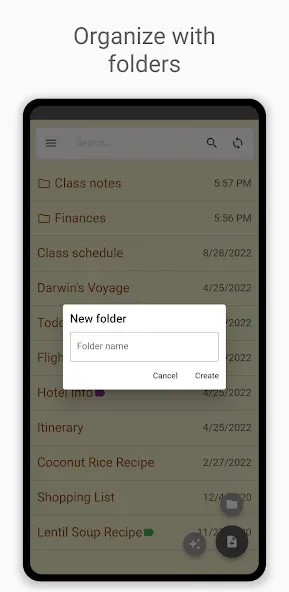
Inkpad Notepad & To-Do List is a note-taking application designed for mobile devices. Beyond capturing inspiration or classroom notes, users can pose questions to an integrated AI chat assistant, which synthesizes information from across the web to provide relevant answers—helping to boost productivity. The app offers a variety of text-correction and grammar tools to ensure your notes are clear and well-written, while a built-in search function allows you to quickly locate specific content using keywords. You can also add password protection to sensitive notes, ensuring your private information remains secure.
Click to load YouTube / 点击加载视频
YouTube ↗Features:
Autosave function ensures your notes are never lost.
Easily create checklists and to-do lists to keep tasks in order.
Sync notes across Android and iOS devices effortlessly.
Chat with an AI assistant for brainstorming and learning.
Writing tools enhance your text with grammar and style corrections.
Challenge yourself with AI-generated quizzes from your notes.
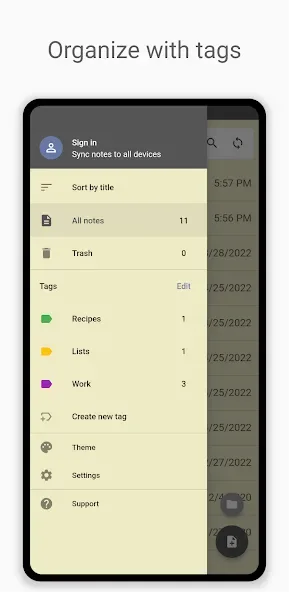
Use tags to categorize your thoughts and ideas.
PIN code protection and note history features available in premium.
User Reviews:
I recently opted for the full paid version. The AI translate works beautifully. Thanks. Sorry this is long overdue. Can't believe the losers complaining about the teeny, tiny little ads. I love how this app keeps your quick and easy notes Forever!
I've had this app since it was created & the reinstall feature of all backed up notes gives me such peace of mind when I get a new phone. thank you for such an awesome app.
I have used Ink Pad for years. It allows you a lot of input up to a certain amount and then you pay a very low monthly cost. if you want to. I could have stayed with it for free, but my notes are important to me and I wanted to use ink pad with a lot more information so I paid my monthly subscription which was only $6.00. it will continually make you put in your password which keeps what you have in there safe from prying eyes. My password is just a very quick and simple four-digit number.
I've used Inkpad for years; my "go to" for notes! The one caveat, is , it refreshes frequently while you're using it, and you have to log in, each time.
Once I got smart enought to group the vidoesI save and put a descriptive title to each different group, it became a very effective way to be able to find particular videos later. I like and use this app regularly.
FAQs:
Can I change the email address used to sign in to Inkpad Notepad & To do list?
This can be done by creating a new Inkpad Notepad & To do list account and following the above Export and import instructions.
My notes have disappeared. How can I restore them?
Check the Trash folder first; trashed notes delete automatically after 30 days. If they’ve been deleted from the trash, they are no longer recoverable. For privacy and security reasons, we do not maintain any data on deleted notes.
My notes won't sync between my phone and online account?
Sync happens inside the Android/iOS app. After editing on the web, open the app and tap the sync button to pull changes down.
Troubleshooting steps
Refresh the webpage so the newest data displays.
Confirm you’re signed into the same Google or Apple account on both the phone and the web.
If accounts differ, sign out and sign back in with the matching Google or Apple account.
Why can't I access my notes online or on a different device?
Most often you’re signed into a different Inkpad Notepad & To do list account somewhere. Inkpad Notepad & To do list accounts map to the email you chose (Google or Apple).
To check
Open the Inkpad Notepad & To do list app menu.
Note the email address at the top.
Use that exact account on every other device and on the website.
Why won't the sign-in work correctly on the website?
Inkpad Notepad & To do list relies on Google or Apple sign-in, which needs third-party cookies and functional browser extensions.
Enable third-party cookies.
Temporarily disable blocking extensions.
Refresh the webpage and sign in again.
Final Thoughts:
Inkpad Notepad & To do list combines straightforward notes and checklists with a GPT-based assistant that can revise text, brainstorm ideas, and quiz you on saved material. Its most practical distinction may be its reach: notes can sync across Android, iOS, and a web browser.