
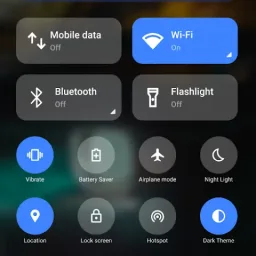
Notification Bar is a tool designed for mobile devices that offers a wide range of customization options. Users can configure various display themes, app icons, and control panels to create an interface that is both aesthetically pleasing and highly efficient. Once set up, the tool provides real-time notifications and alerts from various applications; users can easily dismiss or access these notifications with a simple swipe. Additionally, the app allows for direct music playback, with the background color dynamically shifting in sync with the rhythm of the music.
Click to load YouTube / 点击加载视频
YouTube ↗Features of Notification Bar:
Full color customization: Take the base layout and color all the elements how you like.
Advanced notifications: Get it, read it, snooze or dismiss.
Advanced music: Dynamic colors based on the currently playing album artwork. You can skip to any part of the track right from the notification's progress bar.
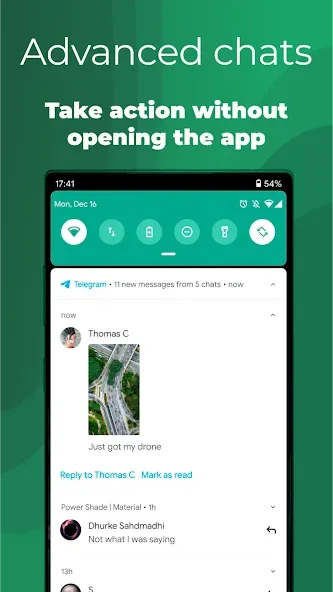
Quick reply: Reply to your messages as soon as you see them. For all Android devices.
Auto bundled: Tired of that one app that spams you notifications? Now they're all grouped together, for easy control.
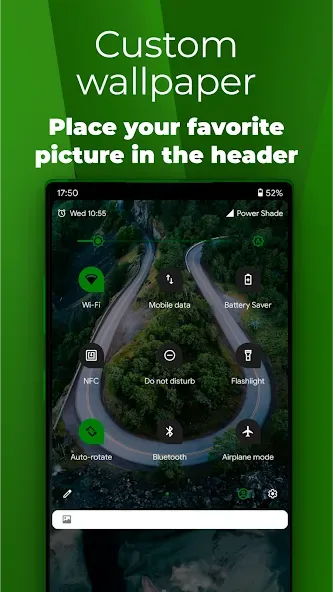
Custom background picture: Pick your favorite image to be displayed in the shade.
Highlights of Notification Bar:
Freely customize the background pictures: In addition, to further improve your on-screen experiences, Notification Bar also provides many beautiful and high-quality images in its wallpaper library. Feel free to pick your favorite images to be displayed in the unoccupied shades of your notification bar. Use the provided images or load up your own personal pictures for more customized experiences.
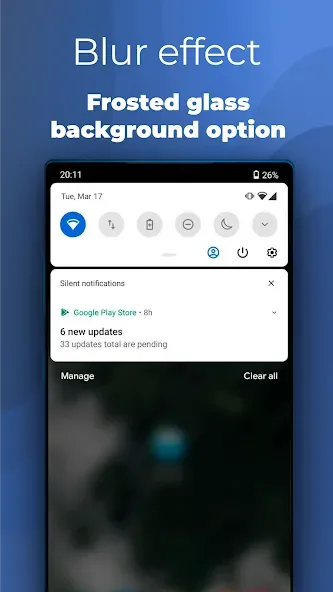
Interesting notification card themes: Here in Notification Bar, Android users can also select multiple card themes, which provide many interesting visual experiences that were inspired by Android 10. Feel free to work with the casual light notifications. Enable colored options with dynamic colors in the card backgrounds. Or try out the impressive dark theme, that can easily immerse all your notifications into the deep black background.
Convenient Quick Reply option: When working with multiple messages from different apps, there is no need to access each of them to finish your replies. Instead, Android users can easily reply to their messages while also working on the notification bars. Choose messages that need to be replied and finish all of them while still staying on your home screen or in any other apps.
User Reviews of Notification Bar:
I absolutely love this app! The only issue I have with it is that some of the buttons (such as battery save mode and cellular data toggle) don't work immediately. I have to press the data button twice and then a notification pops up that I have to click to get to the data settings to manually toggle it. It would be really nice if this was fixed, but other than that issue with toggle buttons, it's absolutely amazing and definitely worth the money for the full version!
I installed it on my Galaxy Note 4 to replace the clunky stock drawer. This app does precisely what I need from it, and it looks great. HOWEVER it left a terrible first impression. It constantly nagged about purchasing the full version, and even started playing a full screen ad at one point! I was tempted to immediately uninstall it. I didn't though - I bought the full version, which doesn't annoy the user. Still, this marketing tactic can be really off-putting.
It's pretty good, but there are some bugs with almost all of the quick settings, mobile data can't be turned on or off, neither location or battery saver, it's really annoying, but after the newest update it worked for a while and then it stopped... But at least the app doesn't get killed by the system, so that's a plus.
I really enjoy this app ready out of the box it is super elegant and clean. The app makes my notifications easier to see and give the slide down a lot of style and I think the cool part is the notifications themselves can be transparent! I like the way each block is grouped together in little boxes and how I can customize the colors and palette of the buttons. It completes the look I was going for for my phone!
FAQs of Notification Bar:
Can I control which apps show notifications in Notification Bar?
Yes, the app allows you to filter notifications by app so you only see alerts that matter to you.
Does Notification Bar include music controls?
It has a built-in music player controller, so you can play, pause, or skip tracks directly from your notification panel.
Is Notification Bar hard to set up for new users?
Not at all. While it has a lot of features, the interface is simple and you can tweak things gradually based on your preferences.
Can I change how the Notification Bar looks?
Absolutely. You can switch themes, adjust layout elements, and even hide or show system info like battery level or storage use.
Conclusion:
For users interested in upgrading their notification management, downloading Notification Bar presents an opportunity to explore a range of customization features that can make their device feel more personal and functional.








