

Poop Downloader is a video and audio application designed for the Android system. It allows users to download videos, with an optimized download engine that ensures fast, efficient performance. Users can choose from various resolutions for their downloads, and the app includes a built-in video player, eliminating the need for additional software. You can also download videos simply by pasting a URL. Once downloaded, videos can be watched offline, and all user information is kept confidential to ensure privacy and security.

Features
Speed and Efficiency:
Download your favorite videos quickly using an optimized download manager.
Multiple Resolution Options:
Choose from resolutions ranging from 360p to 1080p to suit your storage and viewing preferences.
User-Friendly Interface:
Easily preview and download videos by simply pasting the video link.
Built-in Video Player:
No need for extra apps—preview and enjoy your videos directly within Poop Downloader.
Easy Video Downloads:
Download directly via URL—no additional software required.
Offline Viewing:
All videos are stored locally, allowing you to watch them offline anytime, anywhere.
Safe and Private:
Your privacy is paramount; rest assured that your data remains secure.
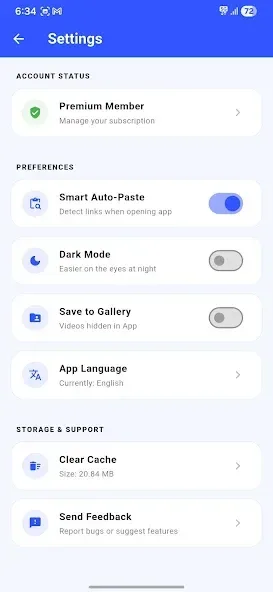
Highlights
Smart auto-paste technology
Support for videos from multiple platforms
Designed specifically for "Poop" links
Privacy support with hidden folders
Save videos directly to your device's gallery
Support for deep-link launching
Download and playback history
Built-in video player
Premium subscription options
Fast, modern, and lightweight user interface

FAQs
Does Poop Downloader support downloading videos from YouTube?
No, Poop Downloader does not support downloading videos from YouTube or any other platform that restricts downloads via its terms of service.
What are the main features of Poop Downloader?
Key features include: fast video downloads via an optimized download manager, a range of resolution options (360p–1080p), a user-friendly interface for pasting links and downloading, a built-in video player for content preview, and the ability to watch downloaded videos offline without an internet connection.
How do I download videos using Poop Downloader?
Using Poop Downloader is incredibly simple: 1) Copy the video URL from your preferred platform; 2) Open Poop Downloader and paste the link into the text box; 3) Preview the video in the built-in player and select your desired resolution; 4) Click "Download" to save the video to your device for offline viewing.

Conclusion
Still struggling to download videos for offline viewing? Poop Downloader makes downloading videos easier, faster, and more convenient than ever! With our intuitive interface and powerful features, you can download your favorite videos in just a few taps. Whether it’s a tutorial, a movie clip, or any other type of video, Poop Downloader ensures you can easily save it and enjoy it offline.








