

TeaTV is an entertainment application designed for mobile devices, featuring a vast collection of films, TV series, documentaries, and television channels across a wide range of genres. Users can easily discover content through built-in search and filtering tools, and add their favorite titles to a personal collection for convenient future viewing. The app offers various resolution options, and during playback, users can adjust settings such as subtitles, aspect ratio, and volume to ensure a comfortable viewing experience. Furthermore, users can log in to their accounts across multiple devices; the app will synchronize viewing history, making it easy to enjoy content whenever a spare moment arises.
Click to load YouTube / 点击加载视频
YouTube ↗Features of Tea TV:
Subtitle Support: Users can select their preferred language for subtitles. Multi-language subtitle support with over 50+ languages available for most content.
Updated Content: Many other apps show outdated and old content without updating to the new content. But you will find that TeaTV completely takes care that its user never gets bored, and this is the reason you will always see the updated content after every few days. Regular updates to the content catalog mean you’ll always find fresh and exciting options, from the latest releases to trending shows.
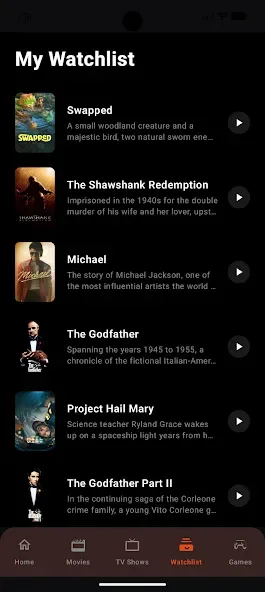
Favourites and WatchLists: In TeaTV, you can tag any of your favourite videos to watch later when you are free. Thus, if you are busy at work and want to watch your favourite content later, then this becomes easy for you in this app.
Global Accessibility: Whether you’re at home on your Smart TV or traveling with your smartphone, TeaTV’s multi-platform support ensures you never miss out on entertainment.
Personalized Viewing Experience: Features like watchlists, playback customization, and content recommendations allow users to tailor their streaming experience to their tastes.
No Subscription: This gives it the uniqueness that you can enjoy the latest, unlimited, and premium content for free without purchasing any subscription. So, you have a chance to save your money and enjoy the latest content for free.
Functions of Tea TV:
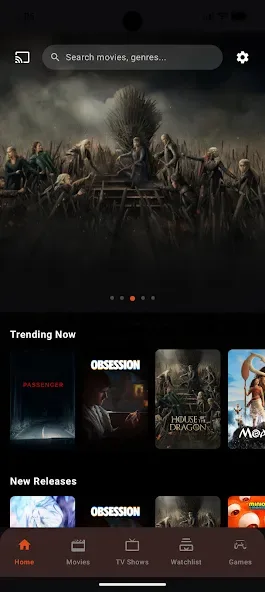
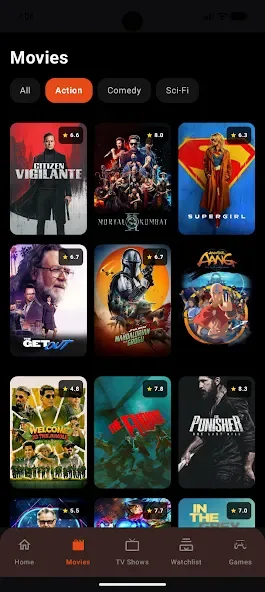
Content Posters: Poster-based browsing makes the catalog easier on the eyes, because recognizable artwork lets users scan titles instead of reading long lists before choosing a movie.
Search History Controls: TeaTV APK provides options to clear previous searches, which helps keep the search area tidy and gives users more control over what remains visible inside the app.
Customizable Display: Certain builds offer display preferences such as poster sizing, letting viewers adjust how much artwork and information appears on screen while browsing their entertainment library.
Android Device Compatibility: TeaTV APK is primarily associated with Android devices, making it practical for users who prefer watching on phones, tablets, Android TV hardware, or other compatible setups.
Simple Navigation: The app focuses on familiar entertainment navigation, with sections for movies, shows, categories, and search that can make finding a casual watch less of a chore.
Regular Catalog Refreshes: TeaTV listings are frequently presented as updated, giving returning users a reason to check back for newer movies, episodes, trending picks, and other fresh entertainment.
User Reviews of Tea TV:
For most people, TeaTV for android phone use starts with everyday viewing rather than a big home-theatre setup. A phone gives you a private screen, mobile data or Wi-Fi, and headphones, so it suits commuting, travel, and late-night watching. Before you install, check that your phone has enough free storage, a recent Android version, and a stable connection, because low storage and weak signals cause most playback problems.
On a phone, the small screen changes how you should set the app up. Choose a comfortable subtitle size, turn on hardware decoding if playback stutters, and pick a download or streaming quality that matches your data plan. If you use mobile data, start with standard quality and move up only on Wi-Fi. Clearing the app cache once a month also keeps menus responsive, especially on older phones with limited memory.
If a title buffers on your phone, first lower the streaming quality, then restart the app and your connection before changing players. For a different build, read the TeaTV guide and compare its trade-offs with the standard app. For a living-room setup, read the TeaTV guide for TV remote and large-screen settings.
Battery and data use matter on a phone, so a few habits help. Download over Wi-Fi when the option is available, close background apps before a long film, and lower brightness a little for evening viewing. If the app closes on its own, free up storage, restart the phone, and reinstall only from a source you already trust. Keep one player set as the default so links open the same way each time, and check subtitles and audio tracks early in a title rather than halfway through.
FAQs of Tea TV:
How do I repair the Teatv not working problem?
If the Teatv app isn’t working and only shows a black loading screen, it’s most likely because it’s banned in your country. To fix this, install a free VPN program, change your IP address, and then relaunch the Teatv app. Using a VPN also protects users’ data, since most reputable VPNs include encryption technology that allows users to browse the internet anonymously.
Why use Teatv APK?
Teatv is a 100% free app with no monthly or yearly subscription fees, making it ideal for individuals who do not want to waste money on OTT subscriptions.
Can I set up a watchlist in this app?
Yes, you may add any movie or series to the watchlist, and you can even curate a collection of your favorite videos.
Can I watch live IPL matches using the Teatv app?
This app primarily covers movies and television series. There is a Live TV option, but users must first import a m3u playlist or streaming link from their IPTV provider before adding live TV channels to this app. If your main focus is live cricket, IPL matches, football, and sports channels, you can also Download Sportzfy APP as a sports-focused Android streaming option.
Summary:
TeaTV is most relevant to Android users who want a searchable movie and television catalog with multiple playback options and the flexibility to watch on either a mobile device or a compatible television.








