Screen Translator is an outstanding online translation utility that helps users easily translate on-screen content and display the results, allowing you to focus on your current task or activity without frequently switching applications and eliminating the frustration of language barriers. The app presents a powerful and easy-to-use screen translation program for a wide user base, allowing users to experience fast and accurate real-time translation, enjoying intuitive translation results through simple operation and a flexible, convenient floating bubble. The app supports rich language detection and image OCR recognition, providing you with an excellent translation service.
Click to load YouTube / 点击加载视频
YouTube ↗Wonderful Features of Screen Translator
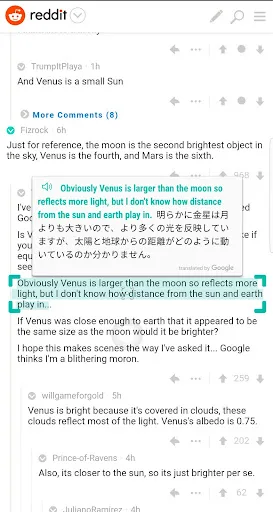
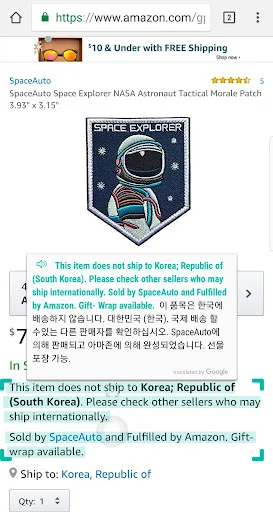
The screen translation function displays a small, freely movable bubble on the screen for instant translation. Clicking the bubble causes the app to detect the text on the screen and display the translation result as an overlay. This method eliminates the need to switch applications, allowing you to stay in the current state while chatting, browsing, or playing games. Get translation results quickly in just a few simple steps.
Real-time translation in any application.
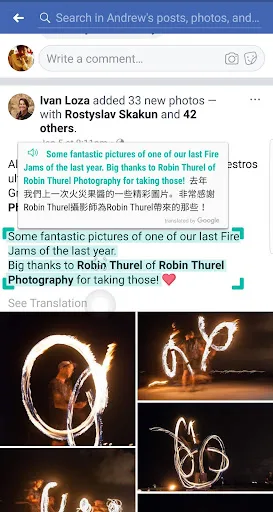
You can directly translate text in instant messaging software, social media, web articles, documents, or mobile games on the screen. The translation interface appears above the application you are using, allowing you to continue reading without losing context. Automatic language detection helps you handle pages or comments that mix different languages, and displays the translation results immediately after detection.
Supports over 100 languages with automatic detection.
Screen translation covers a wide range of languages, making it easy for users to read posts, replies, and website content in multiple regions. You only need to set the target language once, and the system will automatically recognize the source language. This reduces the number of manual switchings, allowing for easy operation even during busy workdays.
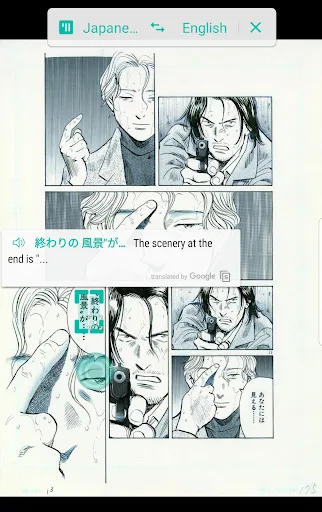
OCR functionality for images, screenshots, and comics
When an image contains text, the built-in OCR function can read the text and provide a translation overlay. This is very useful for screenshots, infographics, and comics or strips with embedded dialogue. You can simply tap to scan and read the translated text directly. This is extremely useful when copying and pasting is not possible.
Voice and camera modes, plus clipboard support.
If you want to photograph printed signs or labels, camera mode can translate the content on the screen. Voice input is very useful when you speak a phrase or want text read aloud. You can copy the translation results to share, and the app can also automatically translate what you copy to the clipboard. These features cover a variety of scenarios, allowing users to translate text on any screen instantly without taking their eyes off the screen for extended periods.
Fantastic Performance of Screen Translator
The screen translator's main function is to instantly translate text on any screen with just a few taps or swipes. Users simply select the source and target languages, then point their device's camera at the text to be translated. Once complete, it displays the original text and the translation in real time. Furthermore, the app allows users to copy the translation and share it via email or other instant messaging applications for easy review later.
This app also comes with several additional features, such as voice input, allowing users to speak into the device without typing words; automatic detection, which automatically detects the input/speaking language; a history function, storing all previous translations for quick access; a favorites function to track frequently used terms; a pronunciation guide to help users learn the correct pronunciation of words in different languages; and finally, an offline mode, allowing users to use certain functions even without an internet connection.
Excellent Benefits of Screen Translator
Flexible and Convenient Operation
The screen translator offers a simple yet powerful user experience. The intuitive interface requires minimal operation; a simple touch is all it takes to start the translation process. It's a comprehensive solution that translates content from a wide range of sources, including websites, social media platforms, images, and text documents. This integrated feature allows you to flexibly translate any text, wherever it appears, in just seconds.
Benefits of Innovation and Accessibility
Screen Translator uses innovative technology to break down language barriers in real time, enhancing interpersonal interaction. It offers a fast and convenient way to translate, especially suitable for travelers, international business communication, and everyday conversations in multicultural environments. With its user-friendly interface and rich language options, this Android app will become an indispensable tool in any language learning kit.
Helpful Tips of Screen Translator
Open the application and follow the prompts to enable accessibility services so it can read text on the screen.
Allow the app to appear on top of other apps so the floating bubble remains visible while using your phone.
Set your target language and enable automatic detection, or you can choose a specific source language if you prefer.
Open any app and tap the bubble to translate the text displayed on the screen. If the bubble obscures content, move it.
When translating images or screenshots, use the OCR option in the bubble menu. For signs or printed pages, turn on camera mode. To speak a phrase, use voice input.
Final Verdict
Overall, the screen translator is a fantastic tool for anyone who wants to easily communicate in multiple languages anytime, anywhere. It boasts a clean interface and powerful features like voice input and auto-detection, making translating foreign language text easier than ever before!