
Users can import a wide range of video and audio formats into Video Player All Format for playback. The software generates subtitles in real time and automatically adjusts its playback mode to suit the current environment, ensuring a comfortable viewing experience. Users can also download their favorite videos and audio files, create custom playlists, and—during playback—fine-tune settings such as aspect ratio, display mode, and playback speed. Furthermore, the application allows users to manage their video library; simply enter a keyword to locate and play the desired file.
Features of Video Player All Format:
Password protected private folder: Video Player All Format lets you lock sensitive clips inside a private folder secured by a password. You can hide personal videos from the main library and access them only when needed. This keeps casual browsing separate from files you prefer to keep out of sight.
Subtitle tools for movies and shows: You can download subtitles and attach them to your videos directly in the player. Timing adjustments help fix out of sync audio or text, and simple controls keep changes quick. This makes it easier to watch content in another language or improve clarity on dialogue heavy scenes.
Cast to TV with Chromecast: Video Player All Format supports Chromecast, so you can stream local videos to a television. Once connected, playback moves to the big screen while controls remain on your phone. This setup is useful for living room viewing without moving files to another device.
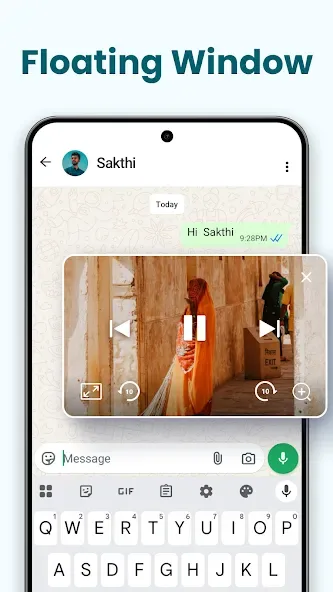
Multitasking and smart controls: Video Player All Format supports a floating popup window, split screen, and background playback, so you can keep watching while using other apps or listen like audio. A smart scanner auto detects videos on your device and SD card, and built in tools let you manage or share files. Gesture controls adjust volume, brightness, and seeking, while options like playback speed, night mode, quick mute, and screen lock fine tune your viewing.
User Reviews of Video Player All Format:
Does What it Do. Been a week. Smooth playback. Effortless sound. Ads? It's always there on the bottom of the app so doesn't bother me at all. No annoying flashing pop ups. After giving full permission/access it can play any media from your phone storage which is just what I needed. Havent had it for very long but so far no crashes either. Thanks for making my life easier devs. Please keep it simple and user-friendly.
This is a great video player and I use it as default as a Premium Member. However, there is no option to find / resume playback of the last video you have been watching after you have closed the app. You just have to remember and find the file from the directory. Another minor problem, when playback is initialized, the lower panel pushes the subtitles upwards and they stay there for the remainder of the playback even though the panel disappears.
Premium user here, been using this for many years and never used other video players ever since. Of all the best features it offers the best is the AI translation which generates .srt format subtitles which are quite accurate at about 80~90% which is acceptable and can be edited with a notepad. This feature is the best as it saves me a lot of time searching for translations which are hard to find especially Japanese and not that accurate.
To be honest, words are hard to explaine how amazing this app really is so it's worth 100 stars, in real life if I meet the developer, I would give him or her a glasses that created on my own, my designe, and everything about it, your app has different features like zoom, slide up for volume and the left or brightness, etc. GOOD APP.
FAQs of Video Player All Format:
What kind of video formats can we play with the Video Player All Format?
Support ALL video formats, including MKV, MP4, M4V, AVI, MOV, 3GP, FLV, WMV, RMVB, TS, etc. All-in-one media player for different formats.
Can we store personal videos in a private folder?
Keep your video safe in a private folder. Support subtitle downloader and more. Play the video in the pop-up window, split-screen, or background.
What kind of other playback features do we get with this app?
Night Mode, Quick Mute, and Playback Speed. Identify ALL video files on your device and SD Card automatically. Video player HD for both Android tablets and Android phones.
Summary:
Overall, Video Player All Format offers a comprehensive video player that makes it possible to play practically any video on your Android device.This app can adapt any video -no matter the format or size- so you can comfortably watch it on your device.








