Google Drive offers a completely new file storage experience, offering nearly unlimited storage space. Users can upload important documents, videos, and images to Google Drive at any time, enjoying comprehensive protection. Sharing functionality allows users to easily share their files to the cloud with a single click, making them easily accessible to others. The software also regularly backs up users' files, providing enhanced protection against loss and a secure user experience.
Click to load YouTube / 点击加载视频
YouTube ↗Features:
File Sharing and Collaboration: Easily share files and folders with others, allowing them to view or edit documents in real-time.
Cross-Device Access: You can access your files from any device, including smartphones, tablets, and computers, enabling flexibility and convenience.
Organizational Tools: Use folders, labels, and search functionality to organize your files efficiently, making it easy to find what you need.
Offline Access: Work on your files without an internet connection by enabling offline mode for selected documents.
Integration with Google Apps: Integrate with Google Docs, Sheets, and Slides for an enhanced productivity experience.
Automatic Backup: Set up automatic backups for photos and videos, ensuring your memories are securely stored.
Version History: Track changes and restore previous versions of documents, making it easy to recover vital information.
Customizable Storage Plans: You can choose from various storage options to suit your needs, whether you require free storage or additional space for a fee.
Easy File Uploading: Upload files quickly from your device or directly from other apps, streamlining the storage process.
Functions:
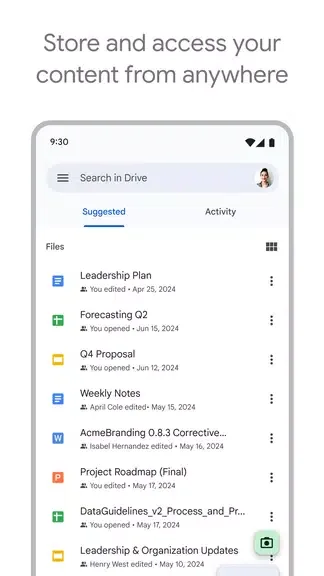
Safely store and access your files anywhere
Edit and store 100+ file types, including PDFs, Office files, videos and more
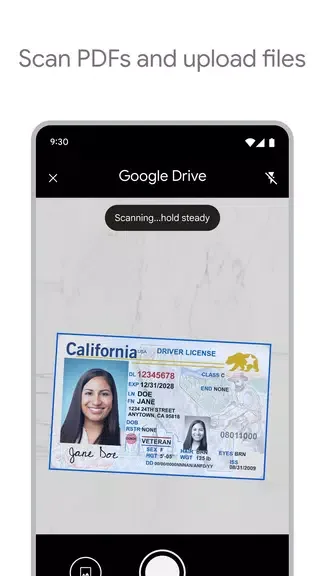
Scan and upload paper documents using your device’s camera
Quickly access recent and important files
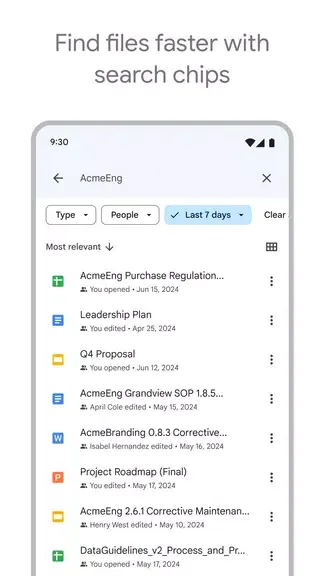
Search for files by name and content
Filter files by type, last modified date and more
Share and set permissions for files and folders
View your content on the go while offline
Receive notifications about important activity on your files
View files more easily on Android tablets with side by side view, drag and drop functionality and more
Using AI to summarize information, retrieve quick facts, and surface insights from your files
Security and management controls for admins to help meet data compliance needs
Sharing files and folders directly with groups or teams within your organization
Creating a shared drive to store all of your team’s content
Requesting electronic signatures and manage vendor agreements, customer contracts, and more
Useful Tips:
Organize Your Files: Create folders and subfolders to keep your Drive tidy and easy to navigate.
Utilize Offline Viewing: Access your important files even without an internet connection by enabling offline viewing.
Scan Documents: Use your device's camera to scan and upload paper documents directly to Drive for digital storage.
Maximize Collaboration: Share files with colleagues, work on them together in real-time, and keep track of changes using version history.
Comments:
I’m shocked that iOS’s G-Drive is working better than Androids version. This is despite my iPhone 12 Max running on iOS 14.5.1, latest is iOS 18.3 (I think), Jailbroken so can’t update. My Pixel 6 is on A14, and have never seen the thumbnail images of my uploaded pics in Androids Drive. Had no idea that was a thing till I just opened iOS’s version and they all populated super quick. I had issues downloading .AVI video files on my Pixel, when I tried on iOS, zero issues. There’s no option to download those vids on iOS though, however, selecting “open in” I was able to choose my video player app, VLC and it looks like it was saved in that app’s Video List. If you’re wanting to download your saved vids in Drive, you may want to have a good video app installed prior to trying to download them. I’m pretty sure no other options like iOS’s stock “Photos” was an option, but that could be related to my me running 14.5.1. Big props to iOS Devs who did a much better job than Google did on their very own apps, using their very own device. I’m a Fan of both platforms, would never say one is better than the other, I truly believe each have their Pros & Cons, for that reason is why I carry both in my pockets everywhere I go and I’m content with that. Leaving home without either one feels like I forgot my left foot.
I use google drive for documents, spreadsheets, slides, photos, collaborating with teams and have essentially replaced my need for other company’s word processing, sheets, and presentations. The part I like most is that it easily plugs in to the apps I use and to website developing for example Squarespace asset storage. I also use google sites which shows up in google drive and saves the pages. I’ve never had a security breach and can share file access to people that are google users and also all other email platforms. I’ve tested this as a non-profit board member for file sharing and had no issues. I’ve been a google drive user since the beginning of it coming out and over the years have changed computers, phones, and iPads. I mostly use Mac’s and Apple devices, but in the workplace we are on PC’s and there are no issues across the two platforms. I use Safari, Chrome, Edge, Foxfire, and have Duck Duck Go running. All of them fully function on every browser I’ve used. With Word and Excell you have slightly different menu bars and options when switching from Mac to PC. I don’t have to worry about that with Google Drive documents or sheets or slides! It is a fantastic product and has helped me be more efficient in all areas. I highly recommend it and google photos!
I first started using Google Drive regularly as the secretary of my local music teacher association several years ago. I love the ability to organize with colored labeled folders, easily share and automatically update docs, and drag and drop files. Being able to actually see snippets of documents is so much more helpful than just a doc title. Having a platform that I can have easy access to on my pc, phone or any other pc I sign in to away from home is so convenient! I also love that I can add pdfs, word docs and view files and spreadsheets without the hassle of opening multiple programs. My husband and children have begun using it for college work and business after I showed them how intuitive it is. It’s like having your computer with all its docs right in your pocket for easy access on the go. I can share resources with piano parents via text, track tuition in sheets, use forms for music camp sign ups and create slide presentations for music workshops and view things on the go on my phone if I have inspiration to change a doc, need to check the status of forms etc.
Summary:
Google Drive is the official Google cloud storage app, which allows you to store and organize all your files and folders from anywhere, using any device. This app is part of the well-known Google Workspace (formerly G Suite), a group of tools and utilities to help you work in the cloud, which also includes Gmail, Google Meet and Google Docs.Google Drive allows you to upload all your files and documents to the cloud, making it easier for you to share them. To upload a file, just choose a document, click on the share button, and click on the Drive button. And that's it. Once you have uploaded a document to the cloud, whether it's a video, a book, or any other file, you can quickly share it by simply sending the link to another person. With the link, anyone can download the file in your account, without complications or issues.