
KeePassDX is an open-source password manager designed specifically for Android. Adhering strictly to Material Design standards, it supports the creation of encrypted database files (.kdb/.kdbx) and utilizes advanced encryption algorithms such as AES, Twofish, ChaCha20, and Argon2 to ensure secure storage of user passwords, keys, and digital identities. Compatible with the KeePass suite of software, the app offers convenient features like biometric unlocking, two-factor authentication with one-time passwords, autofill, and a dedicated input keyboard. It also features customizable themes and a complete history of user activity. Developed in native languages like Kotlin and Java, KeePassDX is ad-free and completely free, offering comprehensive mobile password management functionality in a secure and efficient manner.
Click to load YouTube / 点击加载视频
YouTube ↗Highlights:
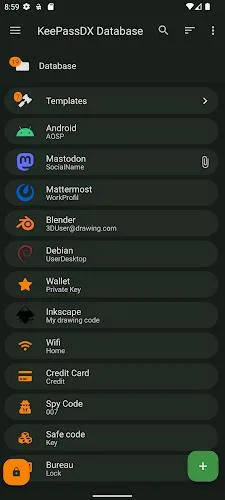
Create database files / entries and groups.
Support for .kdb and .kdbx files.
Compatible with the majority of alternative programs.
Allows opening and copying URI / URL fields quickly.
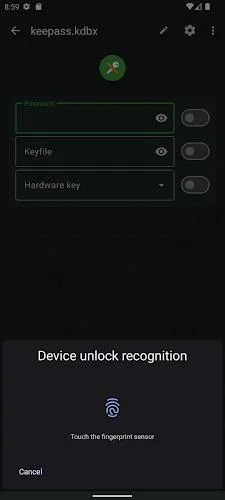
Biometric recognition for fast unlocking.
One-time password management (HOTP / TOTP) for two-factor authentication (2FA).
Material design with themes.
Auto-Fill and integration.
Field filling keyboard.
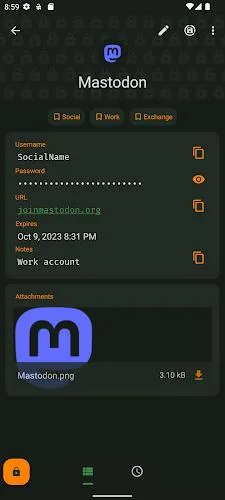
History of each entry.
Precise management of settings.
Features:
Securely save and use passwords, keys, and digital identities
Supports multiple file formats (kdb and kdbx) with advanced encryption algorithms
Compatibility with various KeePass alternatives
Quick access and copying of URL fields
Biometric recognition for fast unlocking (fingerprint/face unlock)
Two-factor authentication support for added security
Tips for Users:
Utilize Biometric Recognition: Take advantage of the biometric recognition feature to quickly unlock your password vault with your fingerprint or face, enhancing convenience and security.
Enable Two-Factor Authentication: Set up one-time passwords for two-factor authentication to further secure your accounts and protect them from unauthorized access.
Customize Themes: Personalize the app's appearance by choosing from different themes to create a visually appealing and user-friendly interface.
Conclusion:
KeePassDX is a multi-format password manager designed to keep your digital information secure and easily accessible on your Android device. With support for various encryption algorithms and file formats, this app allows you to store passwords, keys, and digital identities in a safe and organized way. Not only does KeePassDX seamlessly integrate with other popular password managers, but it also offers biometric recognition for quick unlocking, one-time password management for two-factor authentication, and a user-friendly Material design interface. This open-source and ad-free app is constantly evolving, so you can expect regular updates and improvements to enhance your password management experience. Don't hesitate to check out the Pro version for even more features and support the development of this essential tool.