

Samsung Video Player is a lightweight and feature-rich media playback application designed for Android devices. It delivers a stable viewing experience for both local files and streaming content with extensive format support.
Highlights
- Gesture seek, pinch to zoom, and convenient volume and brightness controls.
- Pop-up player for multitasking with resizable and movable windows.
- Capture screenshots and create animated GIFs to share easily.
- Screen lock to prevent accidental pauses or stops during playback.
- Hardware acceleration for smoother video rendering.
- Support for Super slow-mo video playback.
- Smart View integration to cast videos to larger screens and TVs.
Features
- Precise tap-based seeking and intuitive onscreen navigation.
- Built-in editing tools to trim clips and manage media.
- Customizable subtitles with adjustable color, size, font, and synchronization.
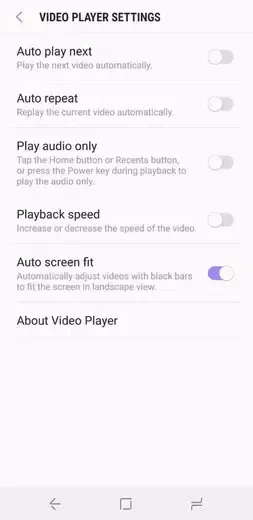
- Audio-only playback, autoplay, repeat, and speed adjustment options.

Tips for Users
- Enable hardware acceleration to improve playback performance on supported devices.
- Use external subtitle files for better timing control with foreign films.
- Keep the application updated to receive the latest codec improvements.
FAQs
Can Video Player handle high-definition content?
Yes, the application supports HD, Full HD, 1080p, and 4K video playback.
Does it support multiple file formats?
Yes, it supports a wide variety of formats including MP4, AVI, MKV, MOV, and FLV.
Can I play audio in the background?
Yes, background audio playback is supported so you can listen while using other apps.

Conclusion
Samsung Video Player provides an efficient way to manage and watch video content on supported devices. Its comprehensive controls and multitasking features make media consumption straightforward.








