
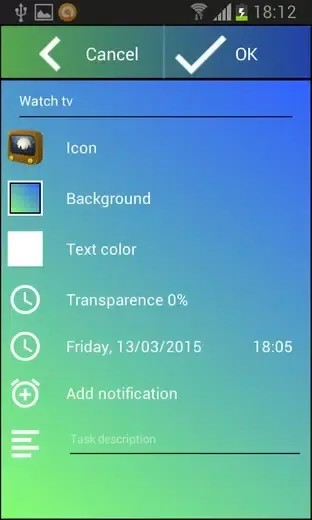
Add Reminder is a convenient tool designed to help you keep track of important dates and tasks. With its intuitive reminder system, you’ll never miss another birthday, wedding, or to-do item. With Add Reminder, you can take advantage of the convenient countdown feature without having to manually calculate how many days are left until an event. At the same time, you can customize the countdown widget and application interface, choosing your favorite themes, colors and backgrounds to create a personalized experience that matches your personal style preferences.
Highlights:
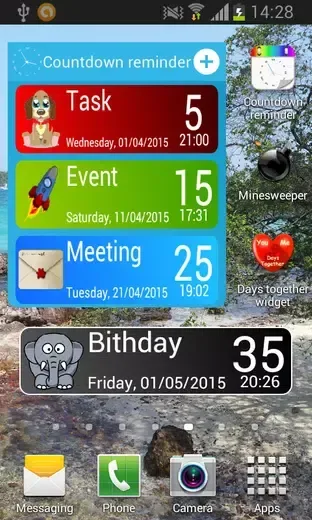
Many Themes
Customize colors
Different widget backgrounds
Add reminder
Features:
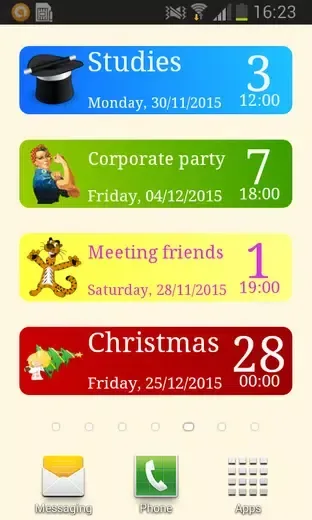
Customizable Countdown Timer
The app features a countdown timer that allows users to track important dates and events easily. You can personalize the timer with various themes and colors, making it visually appealing while keeping you informed about upcoming occasions.
Beautiful Date Countdown Widget
Users can add a visually attractive countdown widget to their home screen, providing a constant reminder of important dates. This feature ensures that you never miss significant events like birthdays, anniversaries, or holidays.
Smart Reminder System
The app includes a smart reminder system that alerts you about upcoming tasks and events. You can set alarms for specific dates and times, ensuring that you stay organized and on top of your responsibilities.
To-Do List Creation
You can create a comprehensive to-do list within the app, helping you manage tasks efficiently. This feature allows you to prioritize your activities and receive reminders for each task, enhancing your productivity.
Morning Call Feature
The app offers a morning call feature that wakes you up with a reminder for your important events. This functionality ensures that you start your day on the right note, fully aware of what lies ahead.
Easy Event Management
With the ability to add reminders for various events, users can manage their schedules effortlessly. Whether it’s a wedding, holiday, or personal milestone, the app helps you keep track of everything that matters.
Tips for Users:
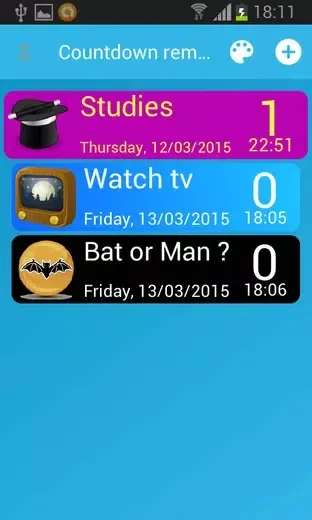
Customize Your Widget: Take advantage of the customization options on Add Reminder to personalize your countdown timer widget according to your preferences. Choose a theme, color scheme, and background that suits your style.
Set Multiple Reminders: Utilize the reminder feature on the app to set multiple reminders for different events and tasks. This ensures that you stay organized and never miss an important date.
Use the Morning Call Feature: Make the most of the morning call feature on the app by setting it to wake you up at the perfect time. Start your day off on the right foot with this helpful reminder.
Final Words:
Add Reminder is a must-have app for anyone who wants to stay organized and never miss an important date or event. With customizable features and smart reminders, this app will help you manage your tasks efficiently and ensure you start each day on the right foot. Click to download now and never forget a date again!








