

TikVid is a video downloader designed for Android devices. Users can download videos by simply pasting the video link into the download box and clicking the download button. The tool supports various quality settings and also allows for audio-only downloads. If the internet connection is lost, the app retains your download history, making it easy to resume downloads later. You can also personalize the app’s theme to suit your preferences. The software features a clean, minimalist interface and is very lightweight, ensuring a smooth and convenient user experience.
Features
Seamless Video Downloading: TikVid makes downloading TikTok videos effortless. Just paste the video link, and TikVid handles the rest—enjoy a smooth and convenient downloading experience.
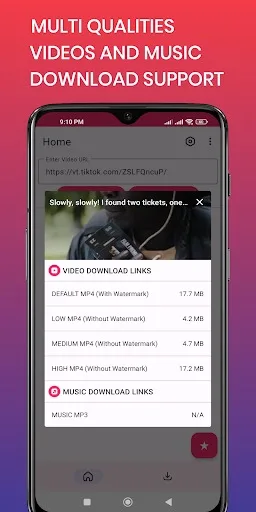
Multiple Quality Options: TikVid offers various quality settings, allowing you to choose the resolution that best suits your needs.
Music Download Support: TikVid supports downloading music separately, making it easy to use trending tracks in your own video edits.
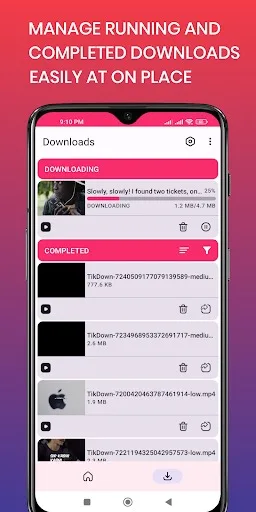
Retry Failed Downloads: Network interruptions won’t ruin your experience; the app allows you to retry failed downloads, ensuring you get all the videos you want.
Pause and Resume: Take control of your downloads—pause them whenever you need and resume later at your convenience.
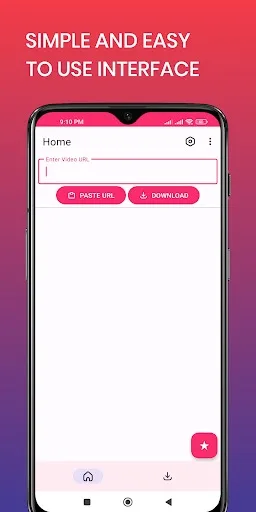
User-Friendly Interface: Designed with simplicity in mind, TikVid makes downloading videos a breeze. Its intuitive navigation helps you start downloads and manage your saved content with ease.
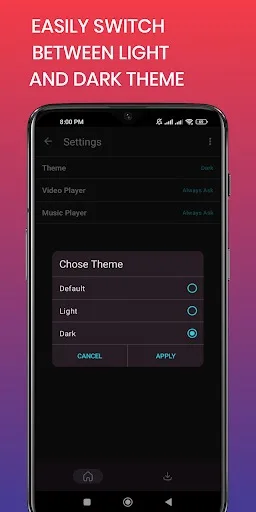
Dark Mode: Customize your experience with a dark theme—perfect for users who prefer a sleek, comfortable, and visually pleasing dark interface.
Pros and Cons
Pros:
Download TikTok videos without watermarks.
Live Photo support (newly added).
Built-in media player for offline viewing.
Simple, fast download process with support for multiple simultaneous downloads.
Cons:
Not featured on any app rankings.
Marketing materials do not explicitly highlight HD downloads or direct link sharing as key features.
User Reviews
I really enjoy using this app; it works seamlessly as soon as you paste the link.
Exactly what I was looking for. It allows for downloads in ultra-high definition (uncompressed)—highly recommended! Thanks to the developers! One request, though: please make my settings permanent so that I get the same quality every time I download.
It runs quickly and reliably. A particularly thoughtful feature is the ability to choose your download format—you can select standard or high-definition video, or even MP3 if you only need the audio. I’ve only been using it for a few days, but I’ve already found it incredibly useful.
Conclusion
TikVid lets you download TikTok videos without watermarks. With this app, you can easily save your favorite videos to your device and enjoy them whenever you like.








