

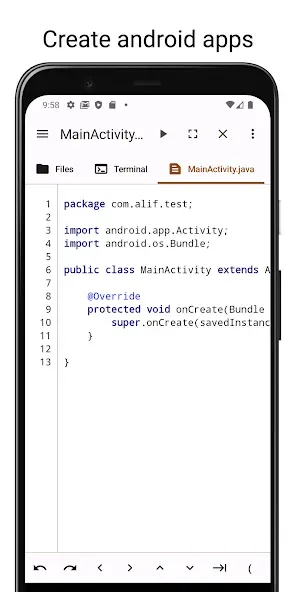
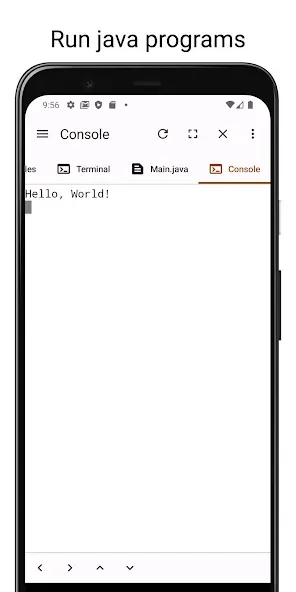
Code Studio is a coding and development application designed for the Android platform. It enables users to create their own installable applications or Java programs directly on their mobile devices. The app features a robust editor for writing code, complete with an intelligent auto-completion function that predicts and fills in your code as you type. It also includes real-time error checking to help identify syntax errors and logical issues. To ensure your work is never lost, the app offers a backup feature. Furthermore, it supports the use of Unix commands, catering to the diverse needs of various users.
Features
An Editor That Truly Understands You
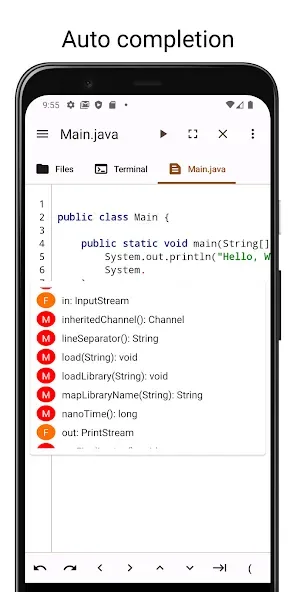
The editor in Code Studio is like a trusted friend—or even a mind reader—that anticipates your needs before you’re even aware of them yourself. With its powerful Java auto-completion, coding becomes easier and more enjoyable than ever. Say goodbye to the burden of complex syntax; your editor is there to help you breeze through it.
What’s more, it performs real-time error checking. With this reliable assistant by your side, you can experiment with confidence, knowing that any errors will be spotted and corrected immediately.
Ever forgotten to save your work, only to regret it later? Code Studio has you covered—and keeps your code safe. If you exit without saving, the automatic backup feature swoops in like a superhero to recover your work. Plus, with undo and redo functions, you can refine and perfect your code exactly as you wish.
The app also provides excellent support for special characters—including tabs and directional keys—even when they aren't available on your virtual keyboard.
A Terminal at Your Command
The terminal in Code Studio is a dependable companion, always ready to assist you. It provides access to the shell and various core Android commands, making your coding journey smoother. It’s like having a bit of magic at your fingertips! For users on older versions of Android, it brings essential Unix commands—such as `grep` and `find`—that are already staples for those on newer devices. Furthermore, support for the Tab and arrow keys is highly reliable, ensuring a smooth coding experience even when the virtual keyboard is otherwise limited.
A File Manager You Can Rely On
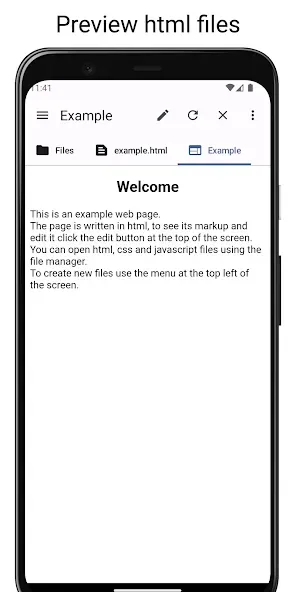
Finally, the file manager in Code Studio will be a steadfast companion on your coding journey. This feature eliminates the hassle of switching back and forth between the app and your device’s file system, allowing you to access files directly from within the application—it’s incredibly convenient!
This file manager is a master of multitasking; copying, pasting, and deleting files is completely effortless. Managing your files has never been easier, letting you focus more on your creative work rather than tedious administrative tasks.
Function
Intelligent Code Editor: Experience an editor that practically "reads your mind," equipped with advanced Java code completion. It anticipates your syntax needs, helping you write complex code with ease while significantly reducing typing time and minimizing typos.
Real-Time Error Checking: Code with peace of mind. Our dynamic error-detection system identifies mistakes and syntax issues as you type, allowing for instant debugging and the maintenance of a clean, efficient codebase.
Professional-Grade Terminal: Harness a fully functional terminal to access the shell directly and execute essential Android commands. For developers using older devices, we provide integrated Unix commands—such as "grep" and "find"—ensuring a modern workflow across all hardware.
Reliable Auto-Backup and Recovery: Never worry about losing a single line of code again. Code Studio features a robust auto-backup system that preserves your work, even if you exit the app unexpectedly. With unlimited undo and redo capabilities, your creative process remains entirely risk-free.
Enhanced Navigation Support: Overcome the limitations of virtual keyboards with dedicated support for Tab and arrow keys, ensuring precise navigation through your scripts and effortless indentation.
Pros and Cons
Pros:
Java code completion and real-time error checking.
Automatic backup of unsaved work upon exiting.
Integrated Android shell and a functional file manager.
Additional Tab and arrow keys for mobile keyboards.
Cons:
The dark theme may occasionally obscure menu labels on tablets. The editor lacks certain features requested by users, such as a cursor position indicator and line-length reference guides.
Conclusion
Code Studio is more than just an application; it is a programmer’s paradise—a world where the rules of programming are entirely under your control. Its editor, terminal, and file manager work in concert, functioning like the gears of a precision machine to deliver an unparalleled programming experience.








